AUTOMATE DATA PROCESSING AND RECONCILIATION
FDPR is a Saas solution designed to automate repetitive data processing and reconciliation tasks.
These tasks often involve several Excel and/or CSV files, links betweeen files, data filering, copy/pasting data or countless lookups.
FDPR aims at streamlining these processes by keeping the same source files, but automating all the data processing tasks.
File locations
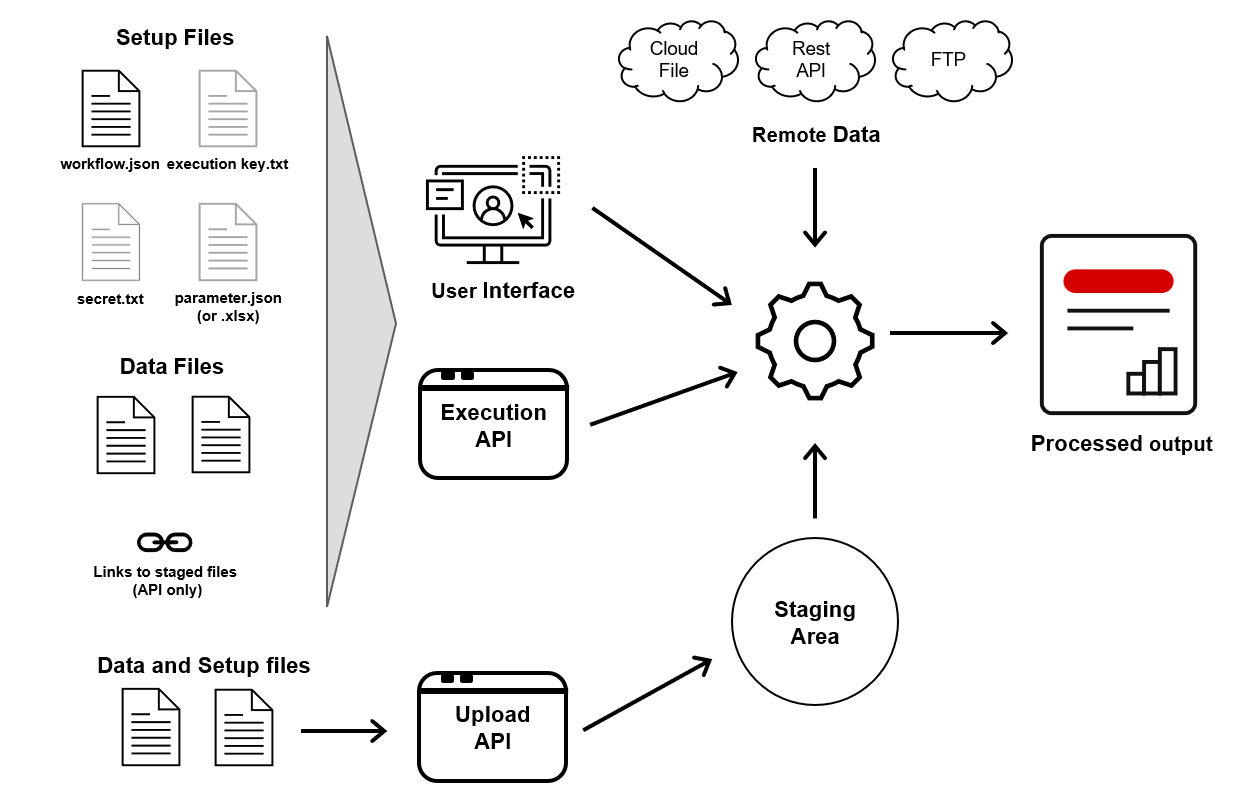
- Local files. Sent directly to the workflow when it is being executed)
- Cloud based files. FDPR will retrieve these files when executing a workflow
- FTP based files. FDPR will retrieve these files when executing a workflow
- Rest API files. Files FDPR will retrieve these files from public or private APIs
- Staged files in FDPR. An api is available to upload files to a temporary staging area, as not all source data files might necessarly be available in a central location.
A single workflow can mix the different sources as required.
File formats
FDPR handles input files in the following four formats:
- Excel / Excel compatible file formats
- CSV / Text files
- JSON files
- XML files
Outputs can be generated in the four formats or as PDFs (based on an HTML template)
Processing
The processing steps are defined in a workflow file, the main steps are:
- Import source data and identify correct data column types
- Apply transformations (called “instructions” in FDPR) like “filter”, “merge”, “concatenate”, “calculate”, …
- Generate output files(s) locally or write result to cloud provider/FTP
Key features
FDPR is a pure workflow processing engine, none of your data are stored permanently
- None of your source data, workflow definitions and generated results are permanently stored in FDPR databases or as files.
- FDPR will only temporary store source files or output files. All these files are encrypted and deleted immediately after a process completed. Regular background job ensure no files are left behind if a workflow fails.
- No AI model / AI Agents are used by the workflow execution engine, all the processing is done in the engine itself (no data are send externally for processing, no additional costs for AI tokens)
Easy to create new workflows
- Create a workflow in the online editor
- Define/Update a workflow manually in a JSON file
- Use an AI Agent to help defining a new workflow. FDPR does not provide an AI Agent, but FDPR offers an MCP interface that lets your AI agent interact with FDPR
Flexible workflow execution
- Manual execution through web interface
- Execution through API call
- Execution by AI Agent through MCP interface
Please check our our videos and blog posts for more information
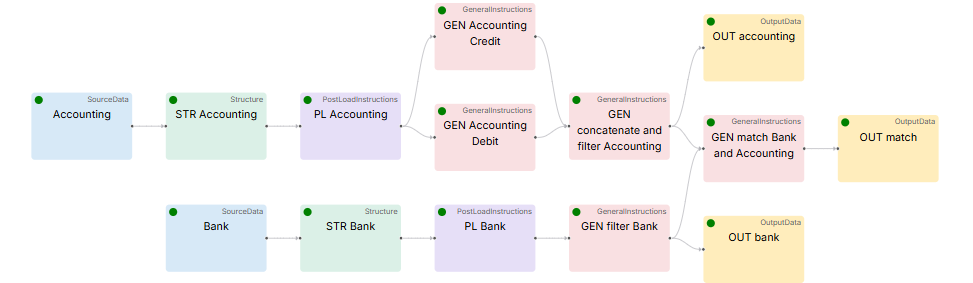
Example of a workfow that reconciles a bank account statement with the bookings done on a bank account in the Accounting software: